Time to create your Space City Structure!
Go to Tinkercad:
Time to start creating and designing your assigned Space City structure.
In the Tinkercad Year 6 Classroom, open your project inside "Space City" activity.
Control + D: The Duplicate and Repeat command (Control + D on your keyboard) is one of the most powerful tools in Tinkercad. It's like having a magical copy machine that remembers exactly what you did!
1. Select Your Object: Click on the shape or group you want to duplicate
2. Duplicate It: Press Control + D to create an exact copy
3. Move the Copy: Drag the duplicate to a new position
4. Repeat the Magic: Press Control + D, and Tinkercad remembers the distance and creates another copy in the same pattern!
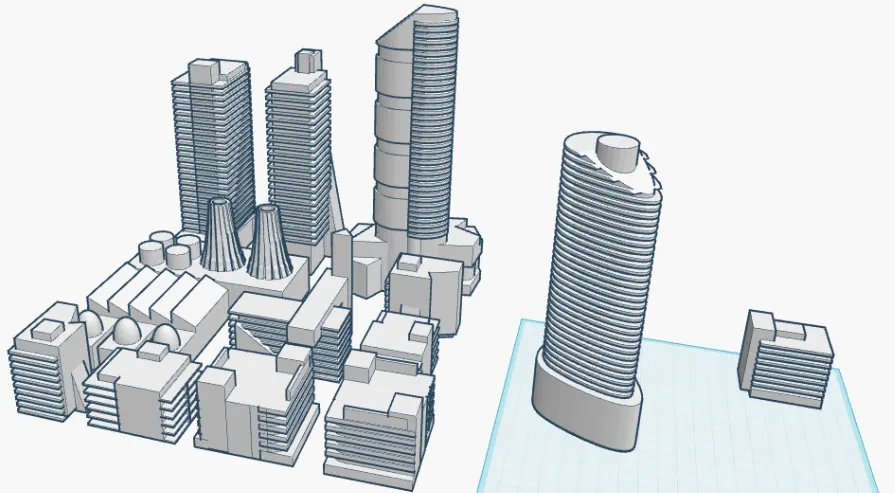
The Duplicate and Repeat command (Control + D) in Tinkercad is best used when building a Space City structure when you need to create multiple copies of a shape or group that are uniformly spaced, or that follow a repeated geometric pattern (linear or rotational).
The power of the command is that it remembers the distance and movement of the first duplicated object, allowing you to quickly repeat that exact transformation for subsequent copies.
For a Space City structure, this command is ideal for:
The power of the command is that it remembers the distance and movement of the first duplicated object, allowing you to quickly repeat that exact transformation for subsequent copies.
For a Space City structure, this command is ideal for:
- Creating Arrays: Making a straight line of identical windows, vents, or solar panels on the side of a building.
- Building Ramps or Stairs: Quickly stacking copies of a thin block with a slight vertical and horizontal offset.
- Rotational Symmetry: Creating spokes on a wheel, support beams around a cylindrical habitat, or repeating modules in a ring by using Control + D, performing a slight rotation on the first copy, and then pressing Control + D repeatedly.
Why Control + D is Essential for Space Cities
Build Repeated Structures Quickly
Space cities need lots of identical modules — living quarters, solar panels, support beams. Instead of creating each one individually, Control + D lets you duplicate complex structures instantly. You can create an entire grid of buildings efficiently in seconds.
Space cities need lots of identical modules — living quarters, solar panels, support beams. Instead of creating each one individually, Control + D lets you duplicate complex structures instantly. You can create an entire grid of buildings efficiently in seconds.
Maintain Perfect Spacing
Once Tinkercad learns your pattern, it keeps everything perfectly aligned and evenly spaced. This is crucial for architectural design where precision matters. Your space city structure will look more organized.
Once Tinkercad learns your pattern, it keeps everything perfectly aligned and evenly spaced. This is crucial for architectural design where precision matters. Your space city structure will look more organized.
Save Enormous Amounts of Time
Imagine manually placing 50 windows on a building, or creating 20 identical habitat modules. That would require significant time. Control + D does it in moments, letting you focus on creativity and design rather than repetitive tasks.
Imagine manually placing 50 windows on a building, or creating 20 identical habitat modules. That would require significant time. Control + D does it in moments, letting you focus on creativity and design rather than repetitive tasks.
Your Mission: to build a single Space City Structure (that your group is assigned to create)
Open Tinkercad and start building your assigned space city structure. To build intricate and repeated patterns quickly and efficiently, make sure to utilize the Control + D shortcut.
As you design, commit to thinking and building on a large scale, ensuring that you incorporate as many relevant and appropriate details as possible that directly relate to the specific type and function of the space city structure you are developing.
You can get inspiration and ideas from Pinterest. But please make sure to use critical thinking skills and ask yourself whether the form and function of the space city structure that you are researching in Pinterest is fictional or whether it is plausible.
Open Tinkercad and start building your assigned space city structure. To build intricate and repeated patterns quickly and efficiently, make sure to utilize the Control + D shortcut.
As you design, commit to thinking and building on a large scale, ensuring that you incorporate as many relevant and appropriate details as possible that directly relate to the specific type and function of the space city structure you are developing.
You can get inspiration and ideas from Pinterest. But please make sure to use critical thinking skills and ask yourself whether the form and function of the space city structure that you are researching in Pinterest is fictional or whether it is plausible.

Click the button below to view what structure your group is assigned to create: