Organizing Code with Functions
A function is a reusable block of code that performs a specific task. Instead of repeating the same instructions multiple times in your program, you can group them into a single function and call it whenever needed. This approach helps keep your code organized and easier to understand. You can think of a function as a custom instruction that you define once and use many times.
Creating Your Own Functions
To create a function, you define its name and the sequence of actions it should perform. Once defined, the function appears as a new block in the toolbox. You can then place this function block anywhere in your program to execute its instructions. Functions can include any combination of actions, such as displaying patterns, playing sounds, or performing calculations.
Exercise 13: HelloFunction
|
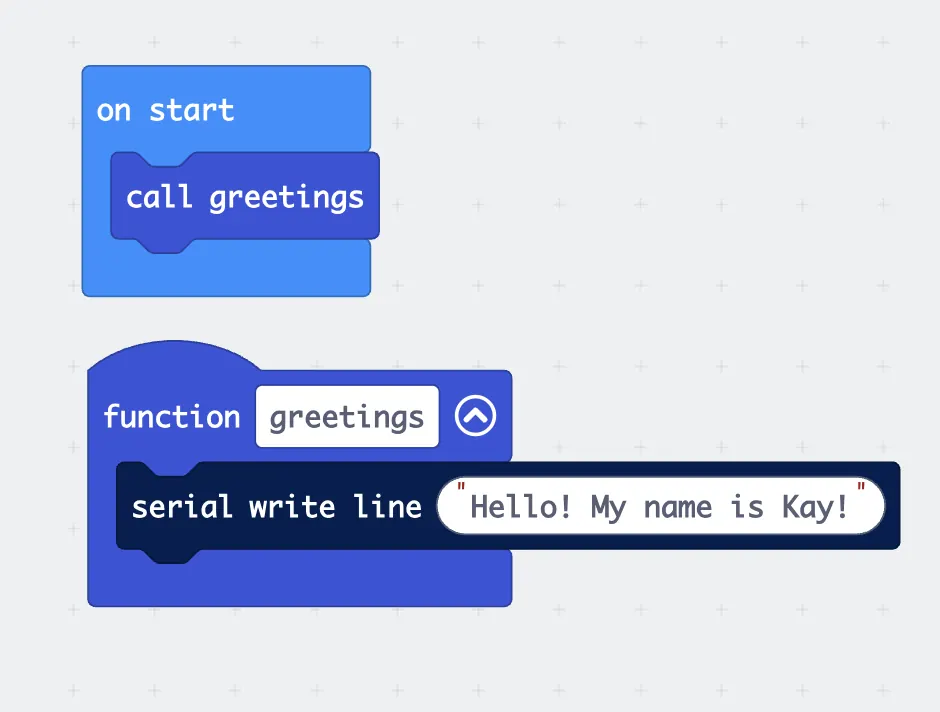
Challenge: Create another function that goodBye that will display good bye message when called. |
 |
Exercise 14: Turning
|
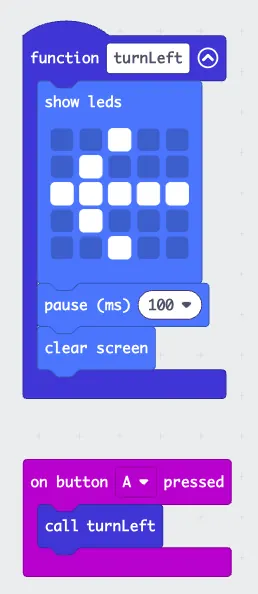
Challenge: Create another function called turnRight that shows the right arrow for 100ms and then clear screen. Activated by button B. |
 |
Using Math Operations in Programs
The micro:bit provides blocks for basic arithmetic operations: addition, subtraction, multiplication, and division. These operations can be used in combination with variables and sensor readings. For example, you can add two numbers together, multiply a sensor value by a scaling factor, or calculate the average of several readings. Math operations help transform raw data into useful information for your projects.
Combining Functions and Math
Functions become more powerful when combined with mathematical operations. You can create a function that takes input values, performs calculations, and returns a result. For instance, you might create a function called calculateAverage that takes three numbers as input, adds them together, divides by three, and displays the result. This allows you to package complex calculations into a simple, reusable component.
Exercise 15 SquareRoot
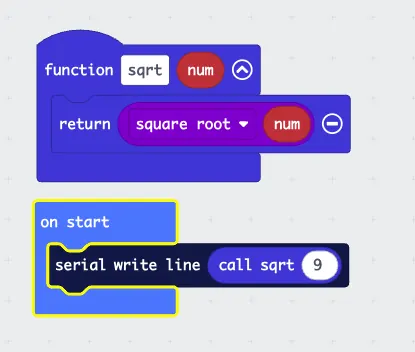
Create a function called sqrt (short from of square root), that depends on a number variable called num. Call the function by providing a number and then display the result on serial monitor.
|
Challenge: Create another function to square the number. |
 |
Exercise 16 AddingNumbers
|
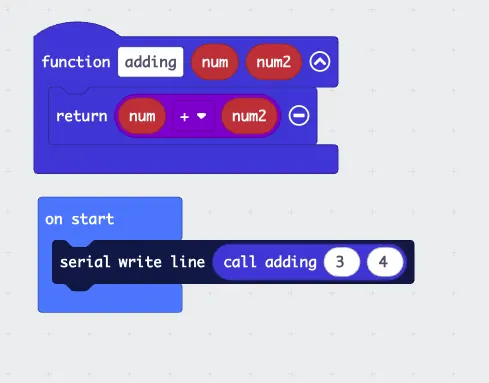
Create a function called adding, that depends on 2 number variables called num and num2. Call the function by providing 2 numbers and then display the result on serial monitor.
Challenge: Create another function that finds the difference between the two numbers. |
 |