Please make sure to use use Google Chrome.
Understanding Variables
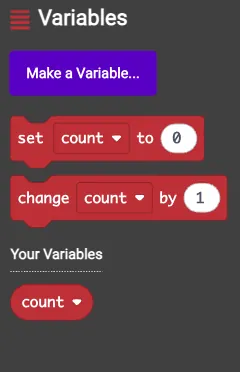
In programming, a variable acts as a container that stores information, such as numbers or text. Think of it like a labeled box where you can put something to use later.
Think of a situation where you are playing a game and need to track your score. A variable acts like a container in a computer's memory that stores information, such as a number, a word, or a color. You assign it a name, like "myScore," so the computer can identify it. This is similar to labeling a box "Legos" to locate your blocks without any issues. The contents of the variable can be updated; for instance, if your score starts at 0 and then reaches 5, the variable will hold the new value.
How Do Variables Work?
Suppose you are creating a basic program about your favorite animal. You might set up a variable named "petName" and store "Fluffy" in it for a cat. If you later have a dog called "Spot," you can update the variable to hold "Spot." In code, this appears as: "Fluffy" = petName. The equal sign indicates assigning the value to the variable.
Variables allow programs to store data, perform calculations, or make choices based on the stored information. For example, a variable called "age" could store the number 9, and the program might display, "You are 9 years old."
Why Are Variables Useful?
Variables enable programs to store and modify data as needed. Without them, computers would not retain information from one step to the next. With variables, you can develop applications like games, stories, or calculators that keep track of scores, names, or results.
In summary, a variable is a named container that holds changeable data, serving as a basic element in programming.
Think of a situation where you are playing a game and need to track your score. A variable acts like a container in a computer's memory that stores information, such as a number, a word, or a color. You assign it a name, like "myScore," so the computer can identify it. This is similar to labeling a box "Legos" to locate your blocks without any issues. The contents of the variable can be updated; for instance, if your score starts at 0 and then reaches 5, the variable will hold the new value.
How Do Variables Work?
Suppose you are creating a basic program about your favorite animal. You might set up a variable named "petName" and store "Fluffy" in it for a cat. If you later have a dog called "Spot," you can update the variable to hold "Spot." In code, this appears as: "Fluffy" = petName. The equal sign indicates assigning the value to the variable.
Variables allow programs to store data, perform calculations, or make choices based on the stored information. For example, a variable called "age" could store the number 9, and the program might display, "You are 9 years old."
Why Are Variables Useful?
Variables enable programs to store and modify data as needed. Without them, computers would not retain information from one step to the next. With variables, you can develop applications like games, stories, or calculators that keep track of scores, names, or results.
In summary, a variable is a named container that holds changeable data, serving as a basic element in programming.
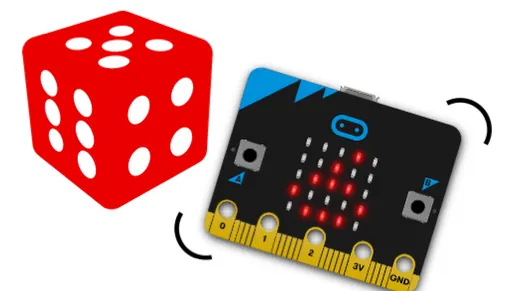
Activity 5: GuessANumber
 |
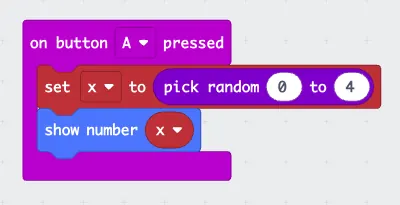
Set x to pick random 0 to 4 and show number x to display the value
|
 |
Challenge: Modify the program so that when button B is pressed, it generates and displays a random number between 5 and 9. Additionally, use the serial monitor blocks to output the message "The random number is:" followed by the generated number. |
Activity 6: Counter
|
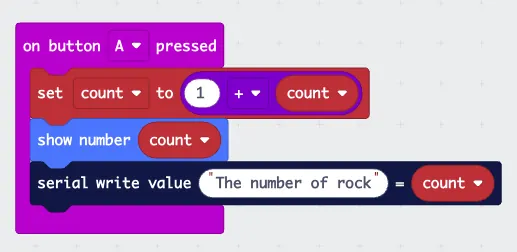
A counter works by pressing a button and the count will be increased by one. Let us make a counter using micro:bit.
Challenge: Modify the program so that when button B is pressed, instead of increasing by 1, it decreases by 1. |
 |
Variables function as containers in your Micro:bit that store and update information to help your projects operate.
By assigning names to them, adding numbers or words, and modifying their contents using buttons or sensors, you can create items such as games, counters, and other projects of your own design.
By assigning names to them, adding numbers or words, and modifying their contents using buttons or sensors, you can create items such as games, counters, and other projects of your own design.